

 Documentation
SWOT DAM Product Documentation
Welcome to the official documentation for SWOT DAM. This guide provides detailed information on system architecture, operational modules, database collectors, and compliance frameworks. Whether you're setting up SWOT DAM for the first time or managing a large-scale enterprise deployment, you'll find everything you need here.
01 Executive Overview & Value Proposition
Database Activity Monitoring (DAM) involves tracking and analyzing database events in real time. Unlike legacy approaches, SWOT DAM integrates security posture management, forensic auditing, and behavioral analytics into a single platform.
Heterogeneous Fleet Coverage
Native integration with Oracle (Unified/FGA), PostgreSQL (pgAudit), MSSQL (Server Audit), and MySQL, alongside Cloud RDS and Aurora.
Non-Invasive Architecture
Zero kernel hooks or invasive inline proxies. SWOT DAM pulls audit streams via native high-performance read loops without impacting transactional TPS.
AI & Behavioral Baselines
Detects anomalous after-hours queries, massive export spikes, privilege escalation, and classifies sensitive PII/Financial columns via LLM intelligence.
Turnkey CIS & Frameworks
Automated compliance mapping for PCI-DSS 4.0, HIPAA, SOX 404, and GDPR Article 32 with one-click tamper-evident auditor evidence packs.
02 System Physical & Logical Architecture
SWOT DAM is engineered as a resilient, two-tier modular architecture designed for high event throughput and minimal resource footprint on monitored production instances.
Physical Components
- Central Audit Backend (`central_audit_backend`): Python 3.10+ service utilizing
FastAPIandUvicornfor high-concurrency REST endpoints. Background jobs are managed byAPSchedulerexecuting inside a dedicatedThreadPoolExecutorpool. - Metadata & Normalized Event Lake: Managed through SQLAlchemy with SQLite or PostgreSQL backend. Stores collector definitions, normalized audit logs, alerts, user profiles, and configuration flags. Target business data is never stored.
- Dam_Frontend (Vite / React SPA): A lightweight single-page application utilizing TailwindCSS, Lucide icons, and React Query for sub-second reactive state hydration.
Addressing Concurrency & Synchronous Drivers
Standard enterprise database drivers (such as cx_Oracle, pymssql, and psycopg2) are synchronous and blocking. If executed directly inside an asynchronous async def route, they would freeze the entire Python asyncio event loop.
# FastAPI Non-Blocking ThreadPool Execution Pattern
from starlette.concurrency import run_in_threadpool
from fastapi import APIRouter, Depends

router = APIRouter()

@router.get("/api/admin/audit-logs")
async def fetch_audit_logs(source_id: int, limit: int = 50):
    # Offload blocking database I/O to background OS threads
    # Preserves 100% responsiveness of the asyncio event loop
    logs = await run_in_threadpool(
        blocking_fetch_logs_from_engine,
        source_id=source_id,
        limit=limit
    )
    return {"status": "success", "data": logs}
# Incremental Oracle SCN / Timestamp Watermark Polling
def poll_oracle_unified_audit(connection, last_watermark_scn: int):
    query = """
        SELECT SCN, EVENT_TIMESTAMP, DBUSERNAME, ACTION_NAME, OBJECT_SCHEMA, OBJECT_NAME, SQL_TEXT
        FROM UNIFIED_AUDIT_TRAIL
        WHERE SCN > :scn_watermark
        ORDER BY SCN ASC
        FETCH FIRST 5000 ROWS ONLY
    """
    cursor = connection.cursor()
    cursor.execute(query, {"scn_watermark": last_watermark_scn})
    rows = cursor.fetchall()
    # Advance high-water mark to prevent duplicates and missed events
    new_watermark = rows[-1][0] if rows else last_watermark_scn
    return rows, new_watermark
03 Security Boundaries & Data Isolation
SWOT DAM is engineered with strict cryptographic boundaries to guarantee that target database credentials and audit logs remain strictly under customer control.
| Boundary Domain | Implementation Mechanism | Security Guarantee |
|---|---|---|
| Target DB Credentials | Fernet Symmetric Encryption (AES-128-CBC + HMAC-SHA256) | Master key stored via environment variable (`FERNET_SECRET_KEY`); passwords never stored in cleartext. |
| User Authentication | Bcrypt Password Hashing (12 salt rounds) + Signed JWTs | Tokens expire in 8 hours (`SESSION_SECRET`); zero reversible password hashes. |
| Multi-Tenant Isolation | Organization Units (OUs) & Collector Group Assignment | Non-admin users can strictly query audit logs from collectors mapped to their assigned groups. |
| Audit Trail Integrity | HMAC-SHA256 Cryptographic Watermarking | Guarantees mathematical tamper-evidence for forensic export packages. |
04 Monitoring Deck & Fleet Topology
The Monitoring Deck (`dashboard.html`) serves as the mission-control cockpit for the enterprise database fleet. It consolidates real-time telemetry across all configured database engines.
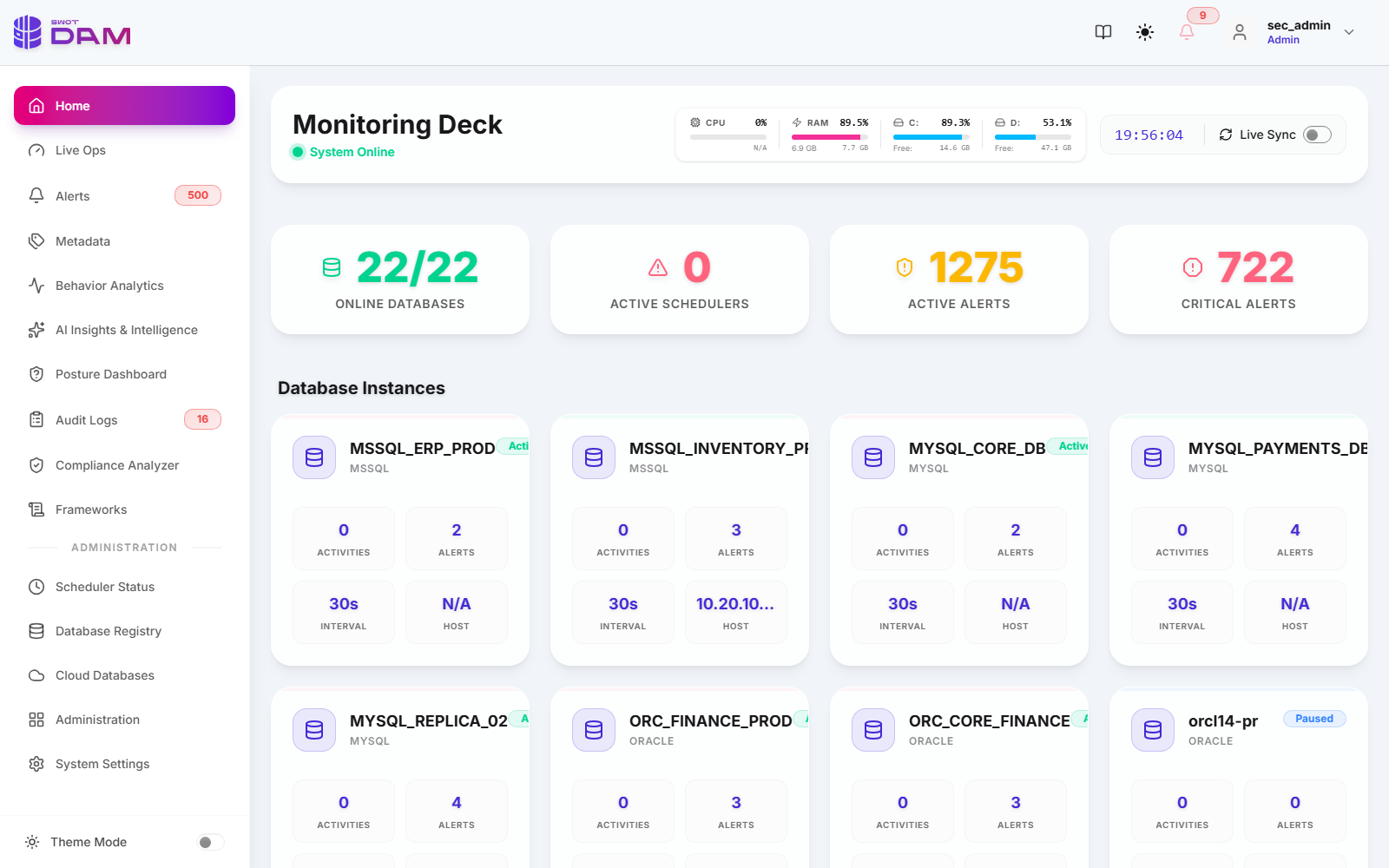
22/22 Online Fleet Indicator
Active ping heartbeat verifies network connectivity, socket response time, and credentials every 30 seconds.
Host Telemetry Gauges
Real-time CPU, RAM, and Disk metrics (e.g. C: 89.3%, D: 53.1%) with live auto-refresh sync toggles.
Active Alert Counters
Aggregated counters displaying active alerts (1,275 total) and prioritized Critical tier anomalies (722 critical incidents).
Interactive Instance Cards
Cards displaying engine type (MSSQL, Oracle, PG, MySQL), polling cadence (30s), activity counts, and host IP addresses.
05 LiveOps Real-Time Telemetry & Lock Analysis
The LiveOps module (`liveops.html`) delivers sub-second operational observability. It bridges database security with DBA operational health, identifying rogue transactions, lock starvation, and long-running exfiltration attempts.
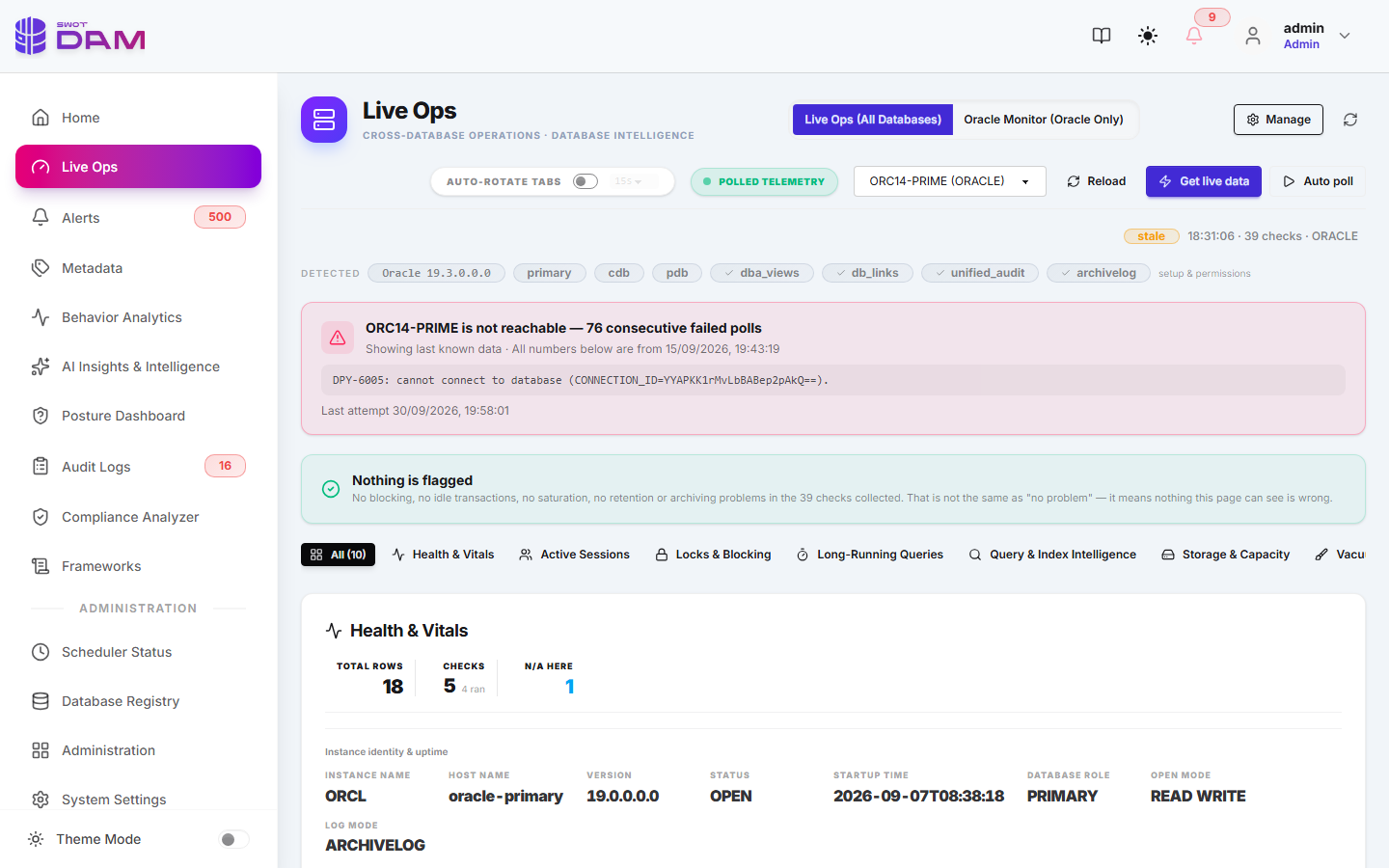
Core Operational Capabilities
- Live Query Stream: Displays actively executing SQL statements across all engines with runtime duration, execution plan hash, and client machine name.
- Blocking Lock Hierarchy: Automatically builds visual tree graphs identifying root-cause blocker sessions (`SID`, `SPID`, `PID`) holding exclusive row/table locks.
- Emergency Session Termination: Provides an authenticated "Kill Session" button executing engine-native abort commands (`ALTER SYSTEM KILL SESSION`, `pg_terminate_backend`, `KILL
`) with automated audit trails.
06 Forensic Audit Log Explorer
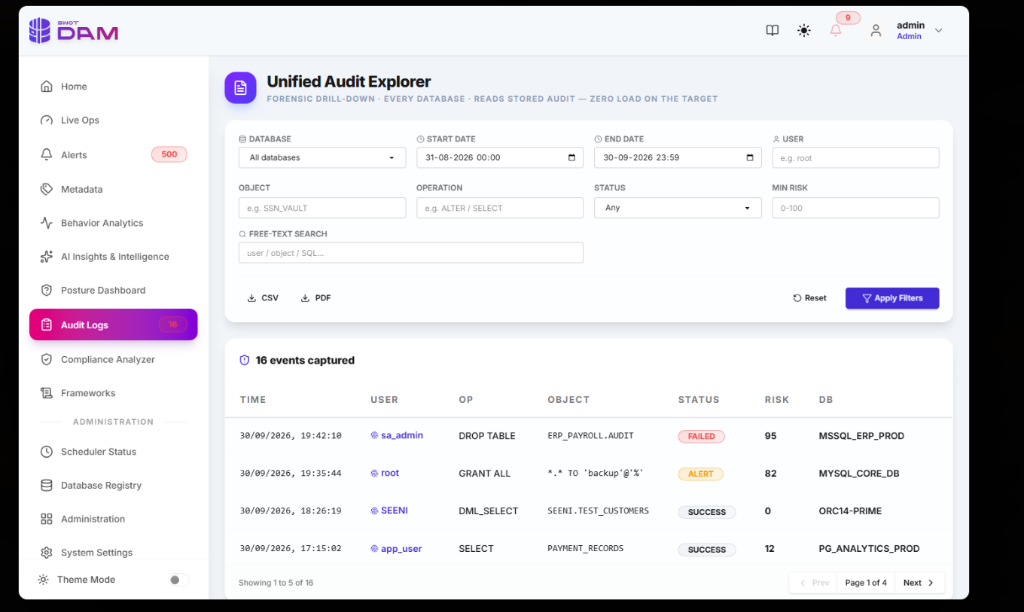
The Audit Log Explorer (`audit-logs.html`) is the primary investigation interface for security analysts, incident responders, and compliance auditors.
| Filter Column | Description | Example Query Filters |
|---|---|---|
Source Database |
Specific instance collector ID | ORC_FINANCE_PROD, PG_CUSTOMER_PORTAL |
Action / Command |
Normalized SQL operation type | SELECT, DROP TABLE, CREATE USER, GRANT |
Client IP Address |
Originating IPv4 or IPv6 network address | 10.20.10.14, 192.168.1.105 |
DB Username |
Database identity authenticated on engine | SYSTEM, app_payment_svc, reporting_ro |
Return Code |
Engine return code (0 = success, non-zero = error) | ORA-00942 (Table not found), ORA-01017 (Invalid credentials) |
Tamper-Proof Export & Forensic Watermarking
Audit logs can be exported directly to cryptographically signed CSV or PDF formats. Each exported batch generates an audit receipt containing the SHA-256 hash of the dataset, ensuring non-repudiation during formal legal or regulatory inquiries.
07 Intelligent Alerting & Deduplication
To eliminate the debilitating "alert fatigue" common in large database deployments, SWOT DAM runs an in-memory Deduplication & Correlation Pipeline before publishing notifications.
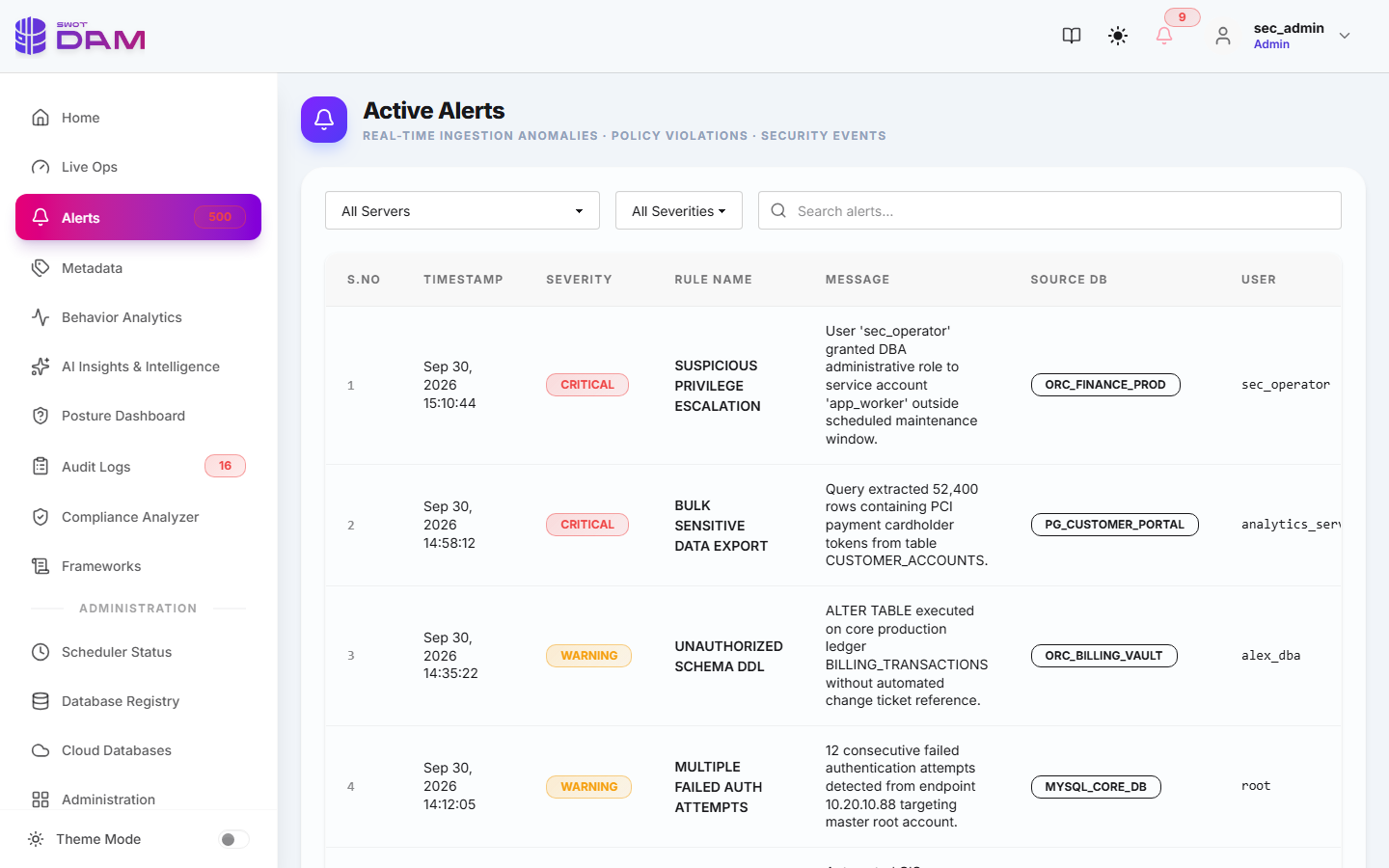
Unauthorized Schema Alteration
Fires immediately when DDL commands (`DROP`, `TRUNCATE`, `ALTER`) execute against production schemas during non-maintenance windows.
Privilege Escalation Events
Detects when accounts grant superuser roles (`GRANT DBA`, `SUPERUSER`, `sysadmin`) or alter security policies.
Brute-Force Authentication
Flags instances where >5 failed authentication attempts occur within 60 seconds from an identical IP or username.
Massive Data Exfiltration
Triggers when a single query reads or exports >50,000 rows on tables flagged as containing sensitive PII or Financial data.
08 Sensitive Data & Metadata Sentinel
The Data Sentinel module (`metadata.html`) scans the metadata catalog of every monitored database to identify and catalog sensitive columns across four critical classifications:
- PII (Personally Identifiable Information): `SSN`, `NATIONAL_ID`, `PASSPORT`, `FIRST_NAME`, `LAST_NAME`, `PHONE_NUMBER`.
- Financial & Payment Cards: `CREDIT_CARD_NUM`, `CVV`, `EXPIRY_DATE`, `BANK_IBAN`, `ROUTING_NUMBER`.
- Protected Health Information (PHI): `DIAGNOSIS_CODE`, `PATIENT_MRN`, `PRESCRIPTION_RX`, `BLOOD_TYPE`.
- Authentication & Cryptographic Secrets: `PASSWORD_HASH`, `API_TOKEN`, `SECRET_KEY`, `AUTH_SALT`.
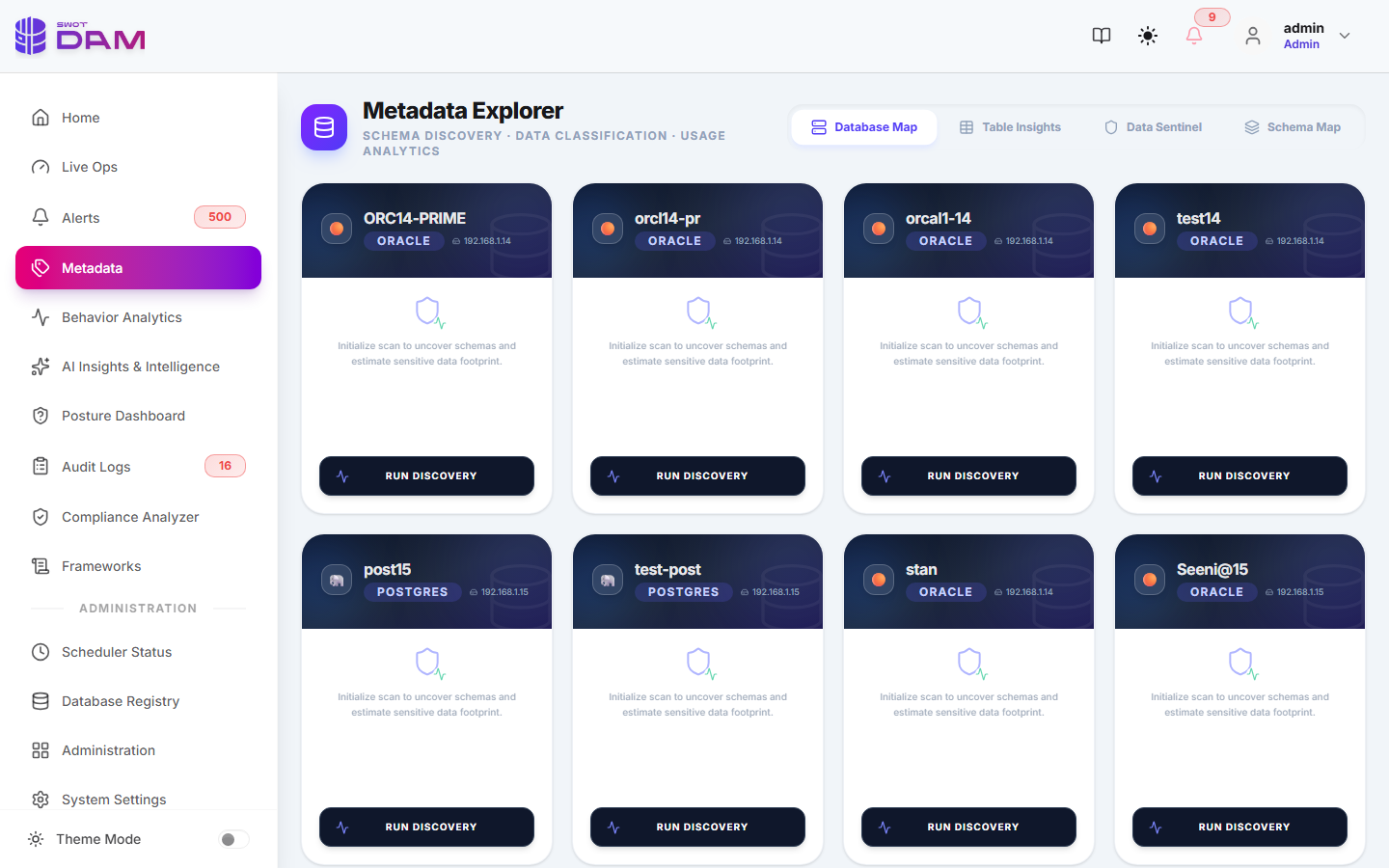
Intelligent LLM Classification Flow
Every 24 hours, the background scheduler gathers newly created table and column definitions and queries the configured AI provider (`gpt-4o-mini`, Azure OpenAI, or local Ollama) using strict JSON structured outputs:
// JSON Response Schema returned by LLM Discovery Engine
{
  "table_name": "CUSTOMER_BILLING_LEDGER",
  "sensitive_columns": [
    {
      "column_name": "CARD_PRIMARY_NUM",
      "classification": "FINANCIAL",
      "confidence": 0.99,
      "regulatory_framework": ["PCI-DSS-4.0", "GDPR-Art32"]
    },
    {
      "column_name": "CLIENT_EMAIL_ADDR",
      "classification": "PII",
      "confidence": 0.95,
      "regulatory_framework": ["GDPR-Art6", "DPDP-2023"]
    }
  ]
}
09 Behavioral Analytics & Anomaly Radar
The Behavioral Analytics module (`behavior.html`) evaluates how identities interact with the database over time. Instead of relying on static signature rules, it computes a dynamic risk score between 0 and 100 based on statistical deviations from a 30-day rolling baseline.
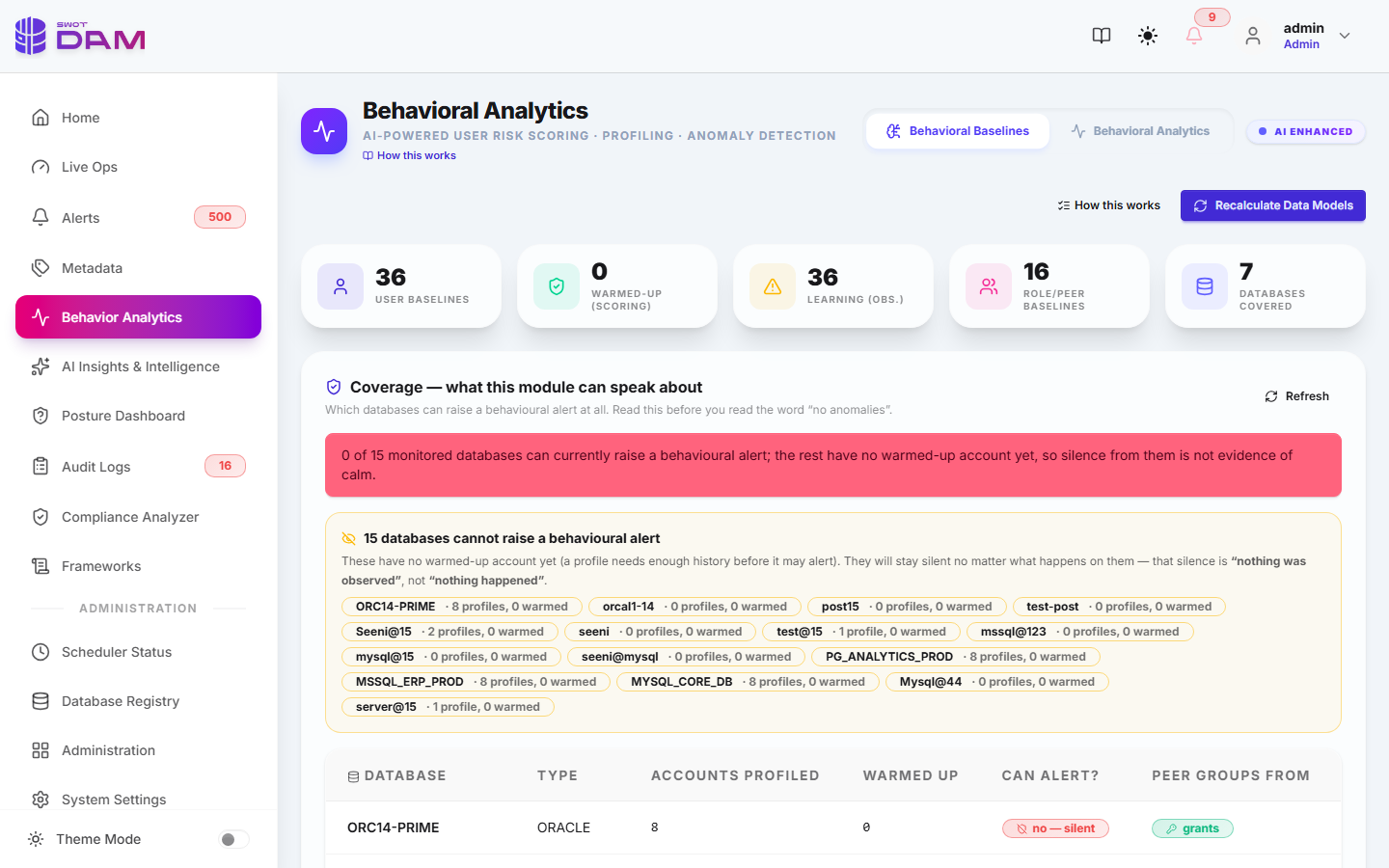
Temporal Deviations
Flags accounts executing administrative queries outside normal operating hours (e.g. batch ETL service accounts querying at 3:00 AM on Sunday).
Source IP Geolocation / Subnet Drift
Identifies when a DBA identity normally connecting from the internal corporate VPN (`10.20.0.0/16`) suddenly authenticates from an unapproved public IP address.
Velocity & Volume Spikes
Detects automated scripts or ransomware attempts reading table catalogs at an abnormally high frequency (>50 queries per second).
10 AI Threat Insights & Autonomous Remediation
The AI Threat Insights module (`ai-insights.html`) transforms cryptic database logs into human-readable incident explanations and provides DBA-grade remediation scripts.
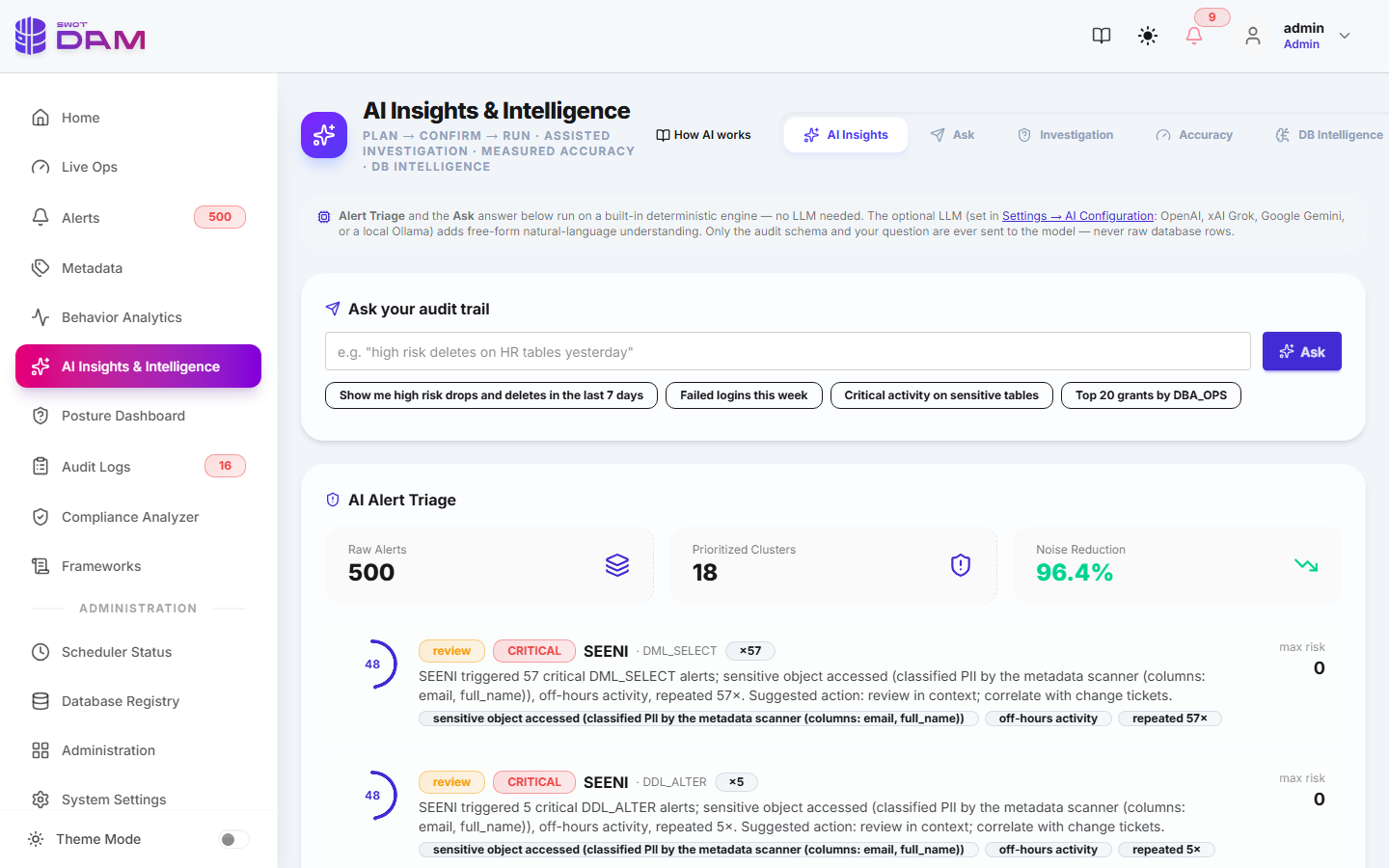
reporting_app executed SELECT * FROM HR_SALARY_DATA from unapproved workstation 192.168.10.45. This query accessed 14,200 salary records, which deviates by +480% from this user's 30-day baseline."
One-Click Remediation Playbooks
For each detected incident, SWOT DAM prepares instant mitigation SQL commands ready to copy or dispatch:
- Revoke Dangerous Role:
REVOKE DBA FROM compromised_user; - Lock Account:
ALTER USER compromised_user ACCOUNT LOCK;(Oracle) /ALTER ROLE compromised_user NOLOGIN;(Postgres) - Kill Active Sessions: Terminates all active connections associated with the suspicious IP address.
11 Database Security Posture Management (DSPM)
The Security Posture module (`posture.html`) continuously audits database configurations against the Center for Internet Security (CIS) benchmarks.
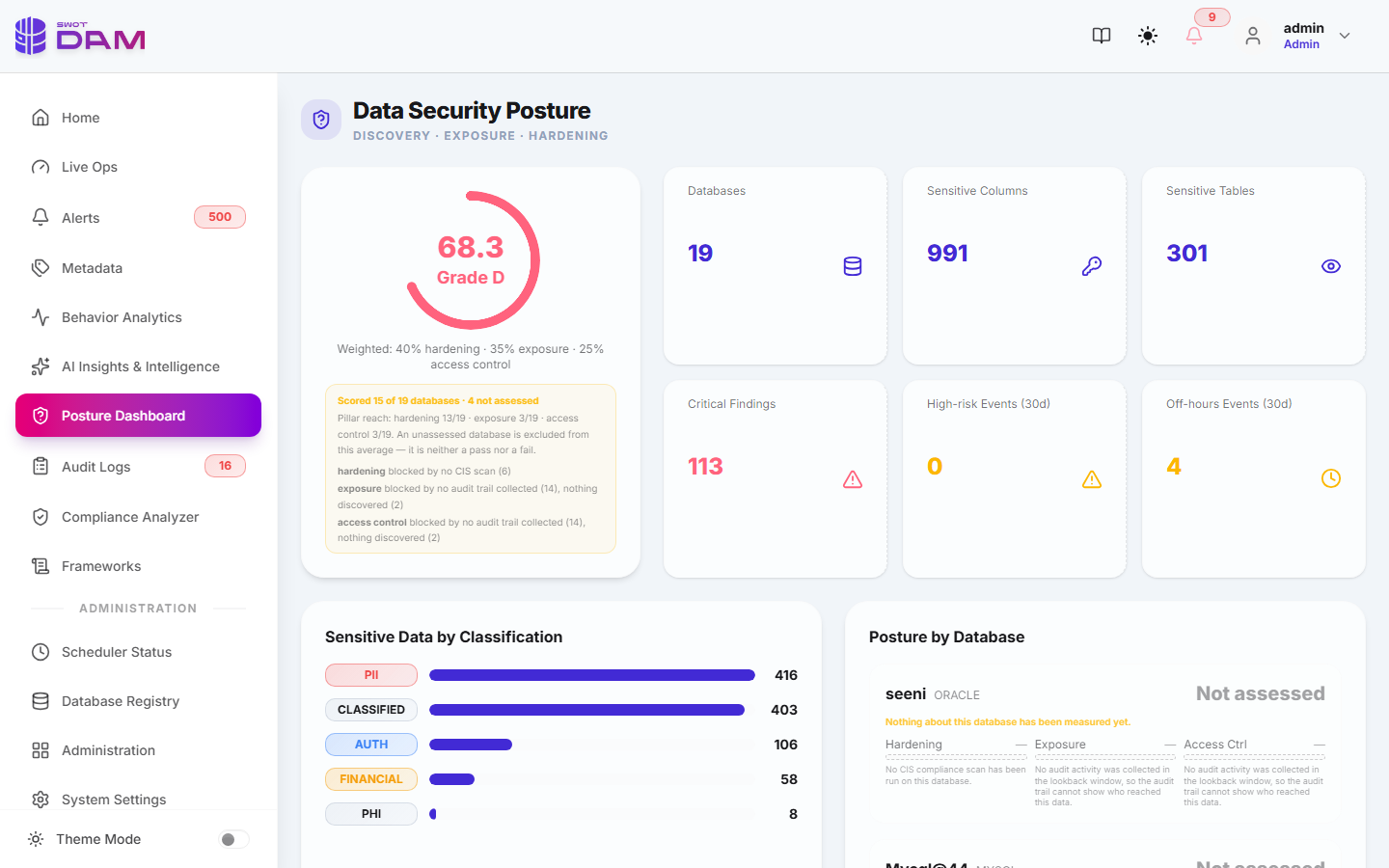
| Benchmark Control | CIS Benchmark ID | Assessment Logic | Severity |
|---|---|---|---|
| Default Passwords | CIS Oracle 1.1 / CIS PG 1.2 | Checks for unexpired default passwords (`SCOTT/TIGER`, `postgres/postgres`, `sa/password`). | Critical |
| Transparent Data Encryption | CIS Oracle 3.1 / MSSQL 2.1 | Verifies encryption status of database tablespaces and WAL/transaction log files at rest. | High |
| Excessive DBA Privileges | CIS PG 2.3 / CIS MySQL 2.1 | Flags application accounts granted superuser privileges instead of least-privilege roles. | High |
| Remote Listener Security | CIS Oracle 2.1 / CIS PG 1.4 | Ensures TLS 1.3 encryption is enforced on listener ports and unencrypted cleartext access is blocked. | Passed |
12 Regulatory Compliance Frameworks
The Compliance modules (`compliance.html` & `frameworks.html`) map all database activity logs and configuration benchmarks directly to international compliance mandates:
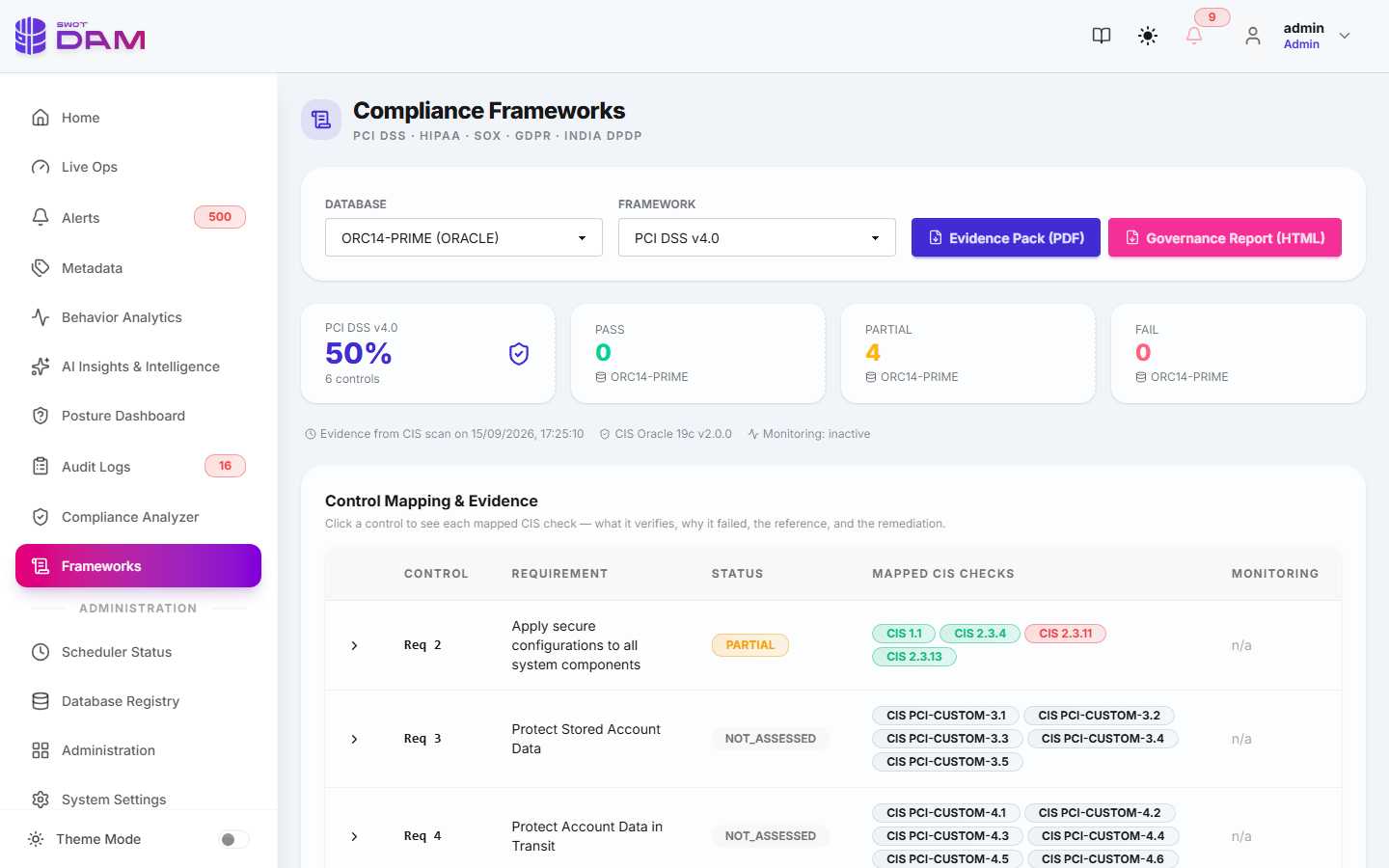
PCI-DSS 4.0
Enforces Requirements 10.2 and 10.3: Complete, tamper-evident audit trails for all actions taken by administrative users on cardholder databases.
HIPAA Security Rule
Satisfies 45 CFR § 164.312(b): Audit controls recording all read, write, and deletion events across electronic Protected Health Information (ePHI).
SOX Section 404
Ensures the integrity of financial reporting systems by flagging any unauthorized schema changes (`DDL`) or manual updates to general ledger tables.
GDPR & India DPDP Act
Fulfills GDPR Article 32 and DPDP Act 2023 mandates by logging processing activities and providing automated data breach notification timelines.
13 Database Collector Configuration Guides
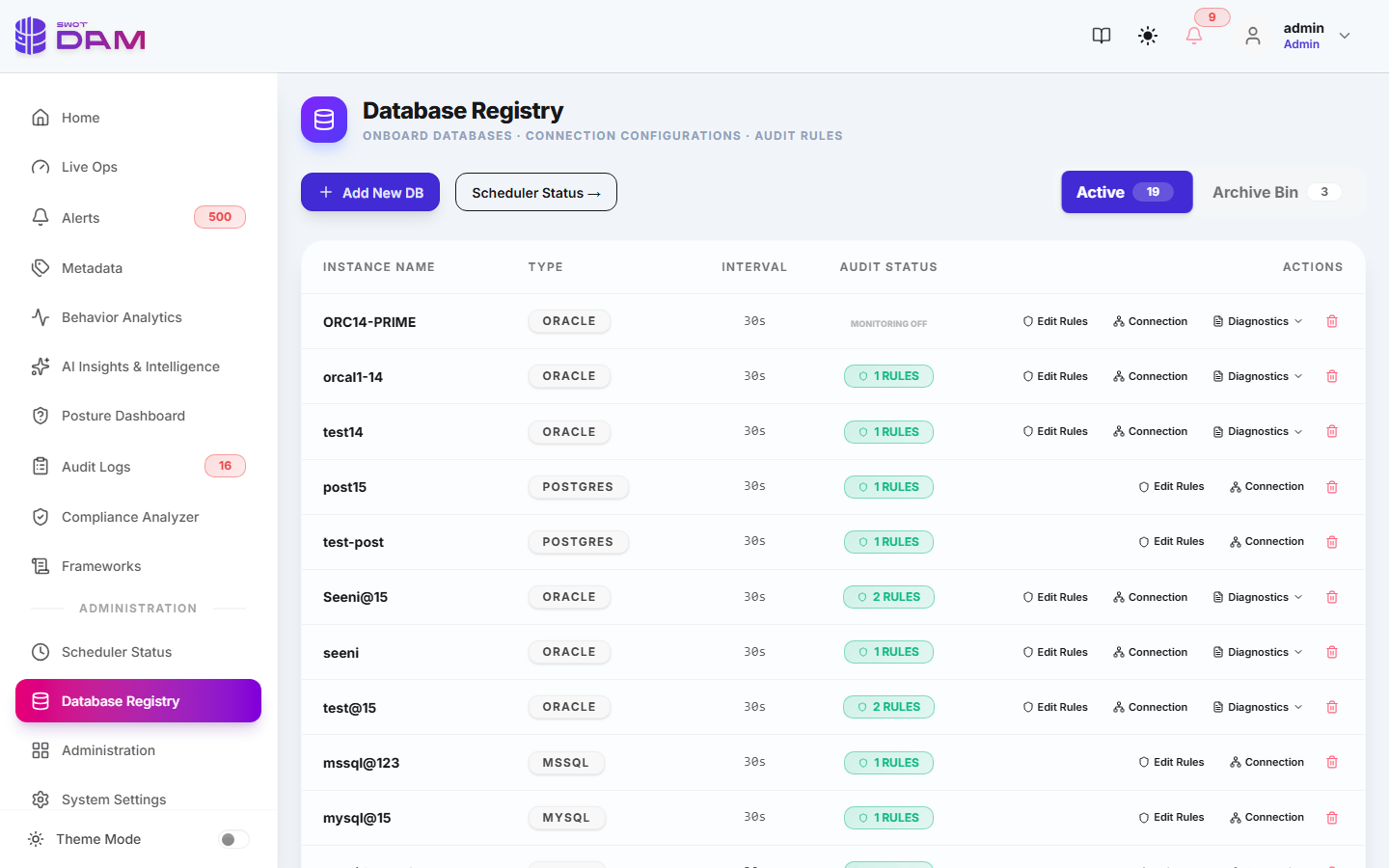
SWOT DAM connects to target databases using native read-only collector credentials. Use the tabs below to view setup SQL scripts for your database engine:
-- ============================================================================
-- Oracle 19c/21c/23c Unified Audit Setup for SWOT DAM Collector
-- ============================================================================

-- 1. Create Dedicated Read-Only Collector User
CREATE USER c##swot_dam_collector IDENTIFIED BY "StrongSecretPassword#2026";
GRANT CREATE SESSION TO c##swot_dam_collector;

-- 2. Grant Read-Only Privileges on Unified Audit Trail & Catalog Views
GRANT AUDIT_VIEWER TO c##swot_dam_collector;
GRANT SELECT ON AUDSYS.UNIFIED_AUDIT_TRAIL TO c##swot_dam_collector;
GRANT SELECT ON SYS.DBA_TAB_COLUMNS TO c##swot_dam_collector;
GRANT SELECT ON SYS.V_$SESSION TO c##swot_dam_collector;

-- 3. Define and Enable Enterprise Audit Policy
CREATE AUDIT POLICY swot_security_policy
  ACTIONS
    LOGON, LOGOFF, DROP TABLE, ALTER TABLE, CREATE USER, DROP USER, GRANT, REVOKE;

AUDIT POLICY swot_security_policy;
-- ============================================================================
-- PostgreSQL 14/15/16 pgAudit Setup for SWOT DAM Collector
-- ============================================================================

-- 1. Configure postgresql.conf Parameters
-- shared_preload_libraries = 'pgaudit'
-- pgaudit.log = 'ddl, write, role, privilege'
-- pgaudit.log_catalog = off

-- 2. Create Database User for SWOT Collector
CREATE ROLE swot_collector WITH LOGIN PASSWORD 'StrongPgPass#2026';

-- 3. Grant Permissions to Read pg_stat_activity & pgAudit Logs
GRANT pg_read_all_stats TO swot_collector;
GRANT pg_monitor TO swot_collector;
GRANT USAGE ON SCHEMA public TO swot_collector;
-- ============================================================================
-- Microsoft SQL Server 2017/2019/2022 Server Audit Setup
-- ============================================================================

-- 1. Create Server Audit Writing to Secure Audit Files
CREATE SERVER AUDIT [SWOT_Server_Audit]
TO FILE (FILEPATH = 'C:\MSSQL\AuditLogs\', MAXSIZE = 100 MB, MAX_FILES = 50)
WITH (ON_FAILURE = CONTINUE);
ALTER SERVER AUDIT [SWOT_Server_Audit] WITH (STATE = ON);

-- 2. Create Audit Specification for Critical DDL and Security Events
CREATE SERVER AUDIT SPECIFICATION [SWOT_Audit_Spec]
FOR SERVER AUDIT [SWOT_Server_Audit]
ADD (FAILED_LOGIN_GROUP),
ADD (SERVER_ROLE_MEMBER_CHANGE_GROUP),
ADD (DATABASE_OBJECT_CHANGE_GROUP);
ALTER SERVER AUDIT SPECIFICATION [SWOT_Audit_Spec] WITH (STATE = ON);

-- 3. Grant View Server State to Collector User
CREATE LOGIN [swot_collector] WITH PASSWORD = 'StrongMssqlPass#2026';
GRANT VIEW SERVER STATE TO [swot_collector];
-- ============================================================================
-- MySQL 8.0 & MariaDB Enterprise Audit Plugin Setup
-- ============================================================================

-- 1. Install Audit Plugin (in my.cnf or via SQL)
INSTALL PLUGIN server_audit SONAME 'server_audit.so';
SET GLOBAL server_audit_events = 'CONNECT,QUERY,TABLE';
SET GLOBAL server_audit_logging = ON;

-- 2. Create Collector User with Least Privilege
CREATE USER 'swot_collector'@'%' IDENTIFIED BY 'StrongMySqlPass#2026';
GRANT PROCESS, SELECT ON performance_schema.* TO 'swot_collector'@'%';
GRANT SELECT ON mysql.* TO 'swot_collector'@'%';
# AWS RDS / Aurora CloudWatch Collector Ingestion Configuration
cloud_collector:
  provider: "aws-rds"
  engine: "aurora-postgresql"
  log_group: "/aws/rds/instance/prod-db-aurora/postgresql"
  auth_mechanism: "IAM_ROLE"
  role_arn: "arn:aws:iam::123456789012:role/SWOT_DAM_CloudWatch_Reader"
  polling_interval_seconds: 30
  batch_size: 5000
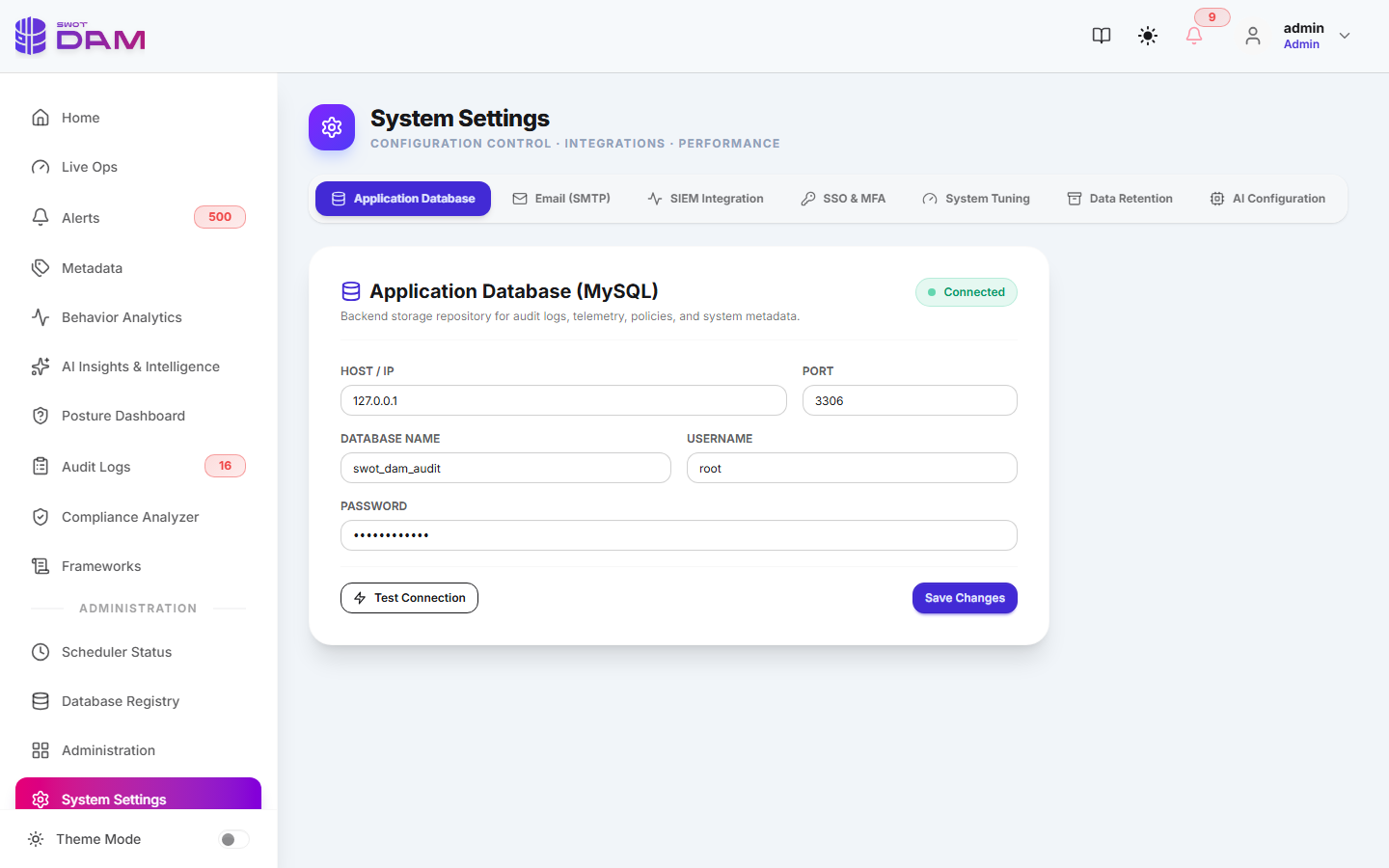
14 Fleet Administration & Enterprise SSO
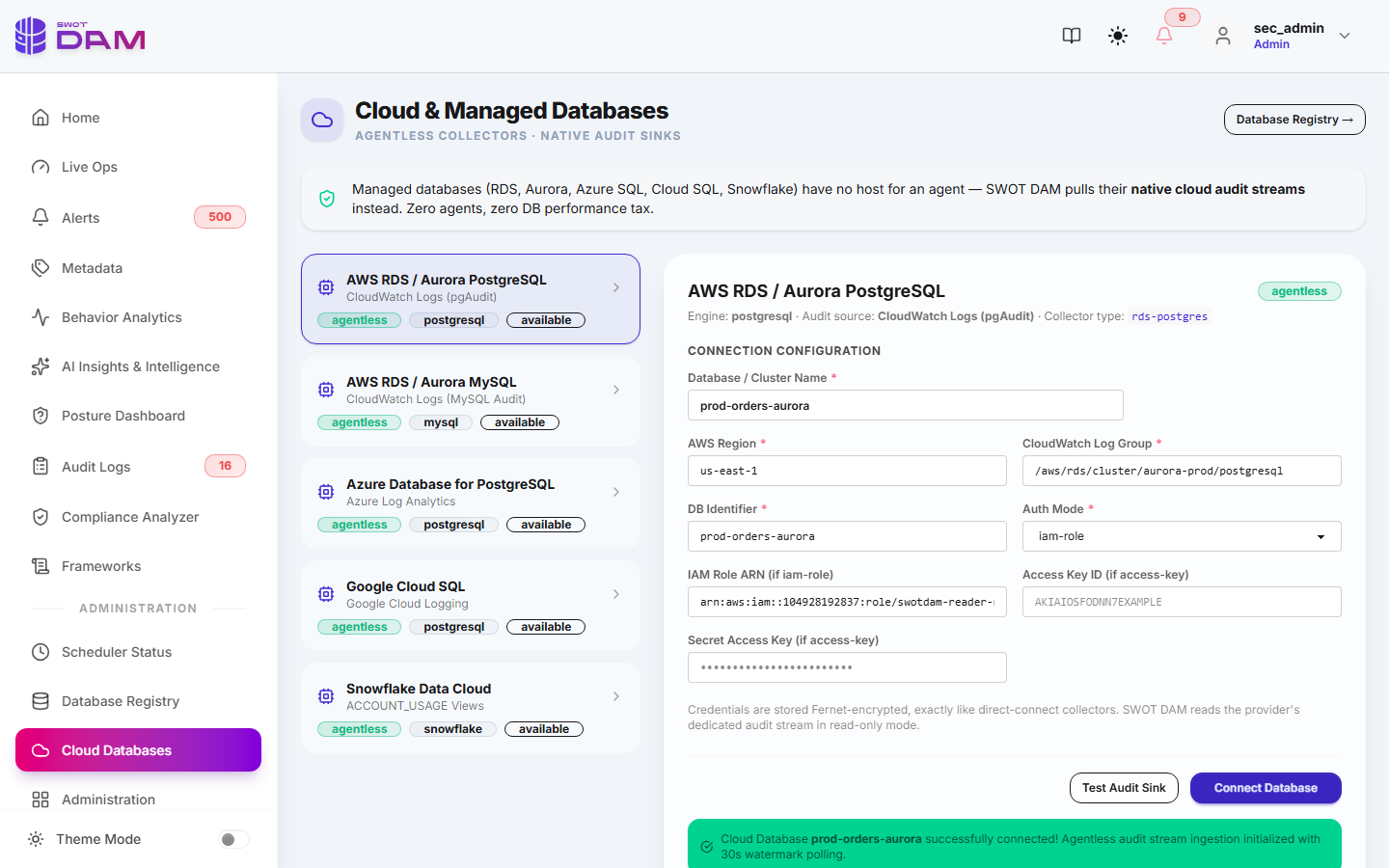
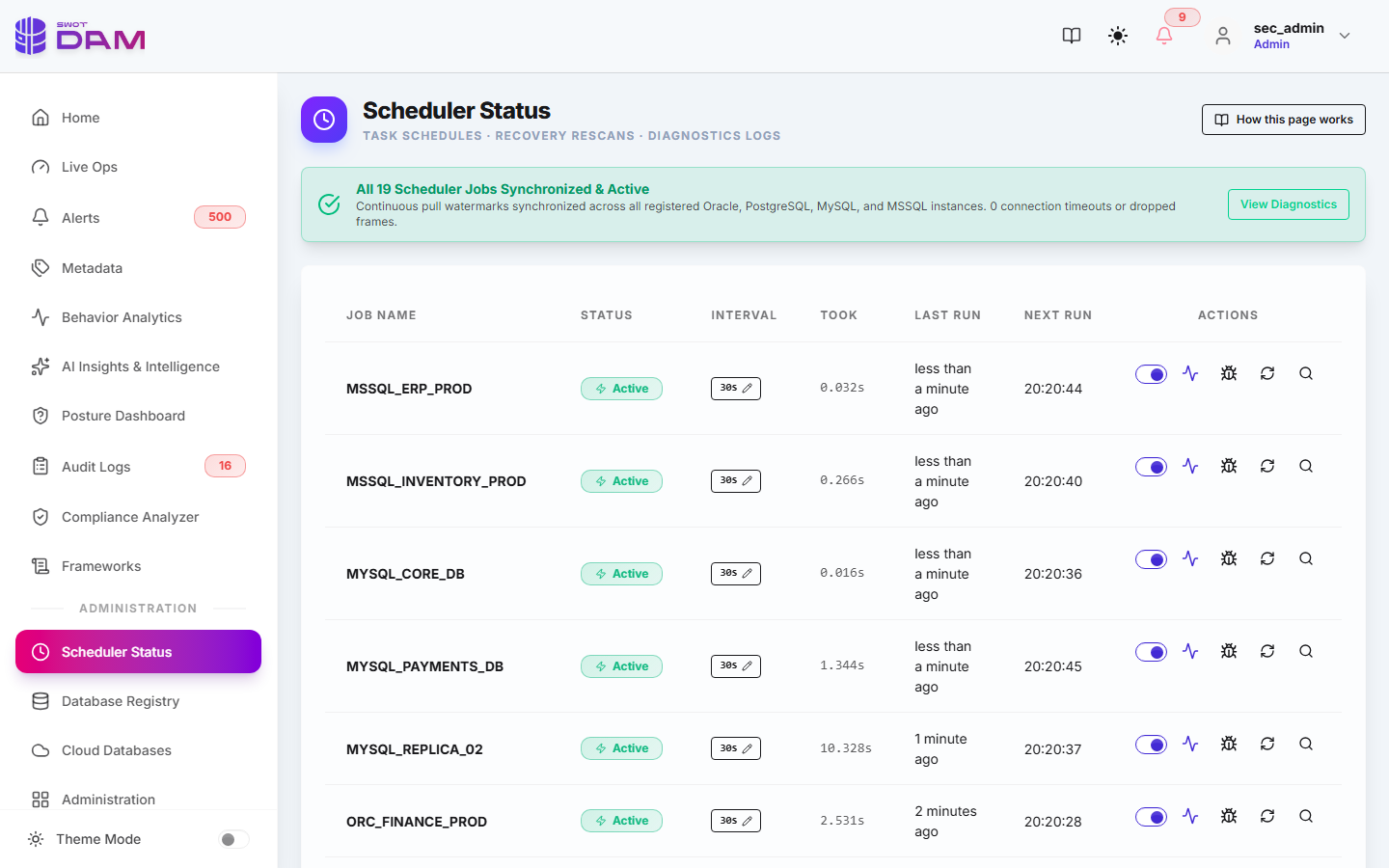
Administrative workflows in SWOT DAM (`admin.html` and `settings.html`) provide multi-tenant isolation, background job diagnostics, and enterprise directory integrations.
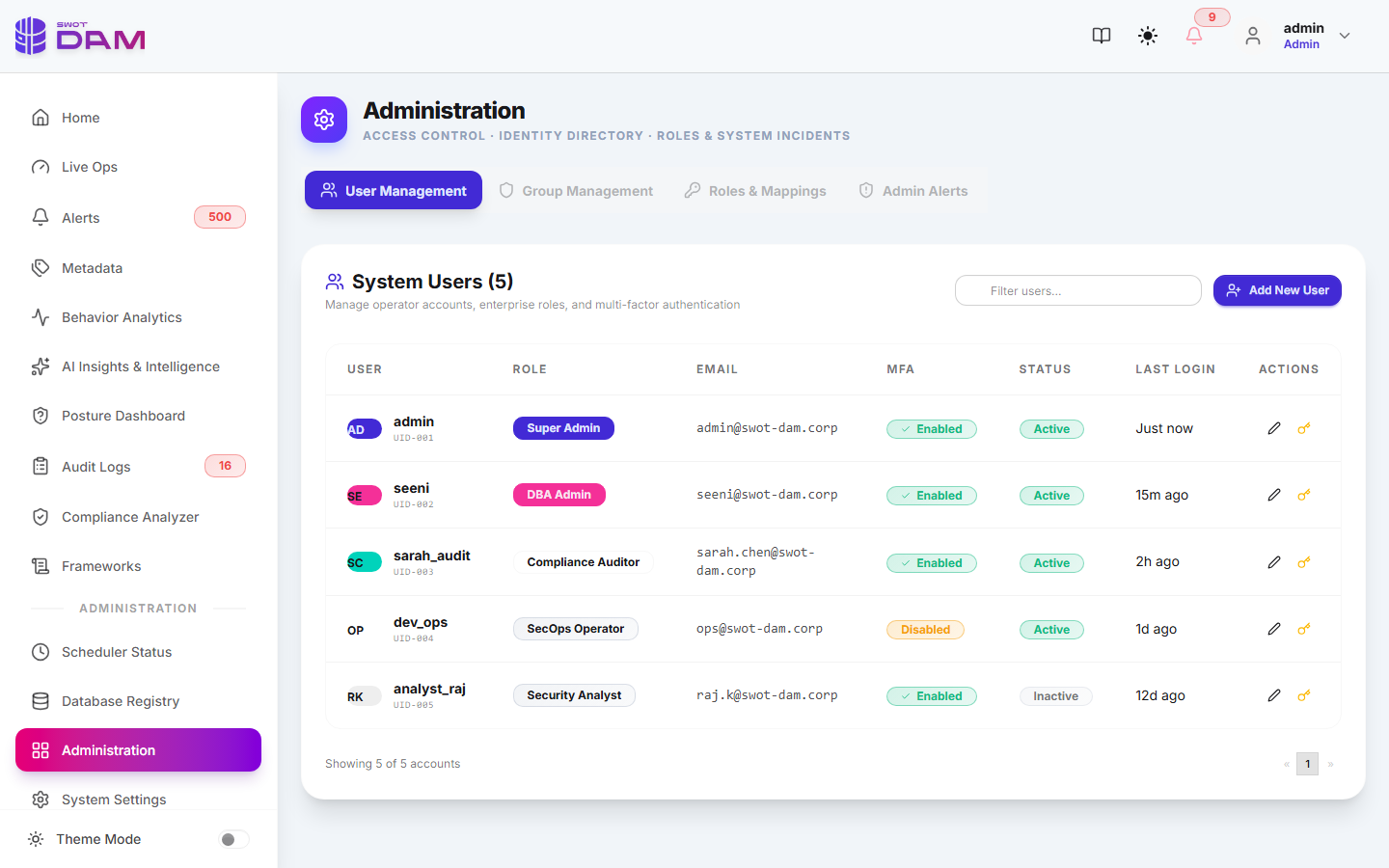
Multi-Tenancy & RBAC Roles
- Admin: Full platform control, collector lifecycle management, user management, and global security tuning.
- Security Officer: Full audit log inspection, behavioral radar analysis, and alert incident triage.
- Compliance Auditor: Read-only access to CIS benchmarks, compliance scorecards, and signed export binders.
- Read-Only Operator: Real-time telemetry monitoring deck view without access to SQL query text or user identities.
Enterprise SSO (SAML 2.0 & OIDC)
SWOT DAM integrates with enterprise Identity Providers including Microsoft Entra ID (Azure AD), Okta, PingIdentity, and Keycloak:
- SAML 2.0 SP-Initiated Flow: Redirects to IdP with signed AuthnRequests; validates SAML assertions using IdP X.509 certificates.
- OpenID Connect (OIDC): Authorization Code flow with PKCE, auto-provisioning user accounts and syncing security groups.
SIEM & Webhook Forwarders
Normalized audit records and alerts can be forwarded in real time to corporate SIEM systems:
- Splunk HEC: Token-authenticated JSON event forwarder with customizable source types.
- IBM QRadar / ArcSight: Standard Common Event Format (CEF) over Syslog (TCP/TLS).
- ITSM Ticketing: Instant incident creation via Webhook for ServiceNow, Jira Service Desk, and PagerDuty.
15 Deployment & Production Runbooks
SWOT DAM can be deployed either as containerized Docker microservices or as a native Windows service using the PyInstaller + WinSW wrapper.
Production Hardware Sizing Guidelines
| Deployment Tier | Monitored Databases | Event Throughput | Recommended Hardware |
|---|---|---|---|
| Small / PoC | 1 – 5 DB Instances | Up to 5,000 events / min | 4 vCPU, 8 GB RAM, 100 GB NVMe Storage |
| Enterprise Medium | 5 – 25 DB Instances | Up to 25,000 events / min | 8 vCPU, 16 GB RAM, 500 GB NVMe Storage |
| Enterprise High-Volume | 25 – 100+ DB Instances | 100,000+ events / min | 16 vCPU, 32 GB RAM, 2 TB NVMe RAID-10 |
Docker Compose Production Deployment
# Complete Production docker-compose.yml for SWOT DAM
version: '3.8'

services:
  swot-backend:
    image: rudratic/swot-dam-backend:latest
    container_name: swot-dam-backend
    restart: always
    environment:
      - DATABASE_URL=postgresql://swot_admin:SecretPass@postgres-meta:5432/swot_dam_meta
      - SESSION_SECRET=c28f9d0e8a7146b38c201a4e9b7f6d5c
      - FERNET_SECRET_KEY=bW9ja19mZXJuZXRfa2V5XzMyX2NoYXJzXzEyMzQ1Njc4OTA=
      - SCHEDULER_THREAD_POOL_SIZE=20
    ports:
      - "8000:8000"
    depends_on:
      - postgres-meta

  swot-frontend:
    image: rudratic/swot-dam-frontend:latest
    container_name: swot-dam-frontend
    restart: always
    ports:
      - "80:80"
    depends_on:
      - swot-backend

  postgres-meta:
    image: postgres:15-alpine
    container_name: swot-dam-postgres-meta
    restart: always
    environment:
      - POSTGRES_USER=swot_admin
      - POSTGRES_PASSWORD=SecretPass
      - POSTGRES_DB=swot_dam_meta
    volumes:
      - swot_meta_data:/var/lib/postgresql/data

volumes:
  swot_meta_data:
Windows WinSW Native Service Deployment
For air-gapped enterprise environments running Windows Server 2019/2022, SWOT DAM is packaged as a standalone native service managed by WinSW.exe:
:: Run as Administrator in C:\SWOT-DAM\service
cd C:\SWOT-DAM\service
SWOT_DAM_Service.exe install
SWOT_DAM_Service.exe start
SWOT_DAM_Service.exe status

:: Auto-restart configuration inside SWOT_DAM_Service.xml
:: <onfailure action="restart" delay="10 sec"/>